New: CTT tracking and customer portal

Turn your 3D printing into a more profitable business.

Calculate costs, create quotes, manage orders, control printers and track your print farm's profit, all in one place.

No credit card required • Set up in minutes

Works with

Bambu Lab · Prusa · Creality · Elegoo · Anycubic|CTT · GLS · DHL · UPS · DPD · Nacex

printmore.app / dashboard

Receita do mês

8.420 €

+18%

Lucro do mês

3.180 €

+11%

Horas de impressão

412 h

+6%

Receita vs. lucro

Impressoras

X1C · 01A imprimir
P1S · 02A imprimir
A1 · 03Manutenção

Fila de produção

Suporte técnico · 12 un.A imprimir
Caixa organizadora · 4 un.Pós-processo
Peça cliente ACME · 30 un.Em espera

Material em stock

PLA Preto820 g
PETG Laranja310 g
PLA Branco140 g

Before and after

Managing a print farm shouldn't be complicated.

Guessing prices on every quote

Real cost with material, power, machine and margin

Outdated spool spreadsheet

FIFO filament stock with alerts

Orders scattered across WhatsApp

Production queue with clear statuses

“Did you ship it?” every day

Customer portal with tracking

Monthly profit only at year end

Revenue, costs and margin always visible

Features

Three areas, one system.

01

Workshop and production

  • Printers, hours and maintenance
  • Production queue and shop floor
  • Bambu Lab telemetry
  • Color-coded statuses

02

Customers and sales

  • PDF quotes and invoices
  • Multiple products and shipping
  • Labels and tracking
  • Customer portal with messages

03

Stock and finance

  • Filaments with FIFO
  • Supplies, purchases and suppliers
  • Cost and margin calculator
  • Revenue and profit reports

In the workshop and in shipping

From printing to delivery, keep every order in view.

Follow your Bambu Lab printers and prepare shipping labels with a tracking code customers can see in their portal.

01 / BAMBU LABIllustrative example

The machine reports. You stay informed.

Connect your Bambu Lab account to check print status, progress, time remaining and temperatures when the printer reports them.

Bambu Lab / X1C · 01Printing
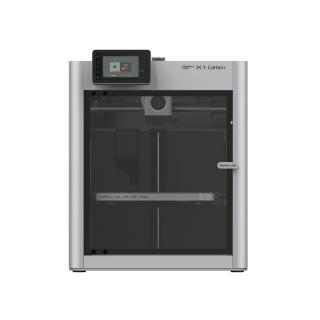
Bambu Lab X1 Carbon

Current job

Technical bracket · PETG

Progress72%

1h 24m

Remaining

245 °C

Nozzle

80 °C

Bed

In the app, available readings update automatically.

02 / CTTIllustrative example

A ready label. An informed customer.

Create and print a shipping label with a barcode. Enter the CTT tracking code so customers can see it and open tracking in their portal.

Shipping labelETQ-0042

Carrier

CTT

Format

A6 · 10 × 15 cm

Tracking code entered

RR123456789PT

RR123456789PT

Tracking code visible in the customer portal

The label does not purchase postage from CTT.

Customer portal

Your customer follows everything, without bothering you.

Send a private link, no logins or passwords, where the customer sees quotes, invoices, order status and live shipment tracking. Fewer 'any news?' messages, more trust in your work.

  • Quotes, invoices and shipping costs visible
  • Order status with progress bar
  • CTT, GLS, DHL, UPS, FedEx, DPD and Nacex tracking
  • In Portuguese and English
Try it for free

Order ENC-0042

Shipped
QuoteProductionShippedDelivered
CTT ExpressoRR123456789PT

Item dispatched09:12

In transit, distribution center14:40

Out for delivery08:05

The product

Always know what's printing.

ENC-0051 · Suporte de auscultadoresX1C #1Printing · 62%
ENC-0052 · Vaso geométrico ×4P1SQueued
ENC-0049 · Peças droneA1 miniReady

Illustrative data.

Calculator

Discover the true cost of every print.

Move the weight and time. Material, power, machine, maintenance, labour and failures all count.

Cost
10,25 €
Suggested price
16,39 €
Profit
6,15 €

Excl. VAT, 60% markup and illustrative reference values.

How it works

From quote to profit in 4 steps.

  1. 01

    Set up your costs

    Printers, electricity, labor and margin.

  2. 02

    Create the quote

    Real price calculated to the cent, with multiple products, shipping and 23% VAT.

  3. 03

    Produce, ship and track

    Production queue, shipping labels and tracking code for CTT, GLS, DHL and more.

  4. 04

    Analyze your profit

    Margins, costs and profitability per printer.

Made for those who take 3D printing seriously.

Makers

Organize your first customers and orders.

Small businesses

Control costs, stock and production.

Print farms

Coordinate multiple printers and maximize utilization.

Companies

Control teams, margins and operations.

Pricing

Start for free. Grow when you need to.

MonthlyAnnual-20%

Free

To get started

0 €/mo

  • 1 printer
  • 20 customers
  • 20 orders/month
  • 500 MB of storage
  • Basic calculator
  • Basic dashboard
Start for free

Starter

For small businesses

5,99 €/mo

  • 3 printers
  • Unlimited customers
  • Unlimited orders
  • 5 GB of storage
  • Quotes and invoices
  • Production queue
Start now
Most popular

Pro

For growing businesses

12,99 €/mo

  • 10 printers
  • Everything in Starter
  • 25 GB of storage
  • Advanced calculator
  • Advanced analytics
  • Maintenance management
Start now

Business

For teams

24,99 €/mo

  • Unlimited printers
  • Everything in Pro
  • 100 GB of storage
  • Multiple users
  • Roles and permissions
  • Dedicated shop floor
  • Tracking and shipping labels
  • Exports and API access
  • Priority support
Start now

No lock-in. Cancel anytime. Prices exclude 23% VAT.

FAQ

Frequently asked questions.

Ready to turn your print farm into a more profitable business?

Start for free and discover how much you can improve your 3D printing management.